
eKeypad Video3.0.4 - App Store
You'll be able to see results in few seconds.
Publisher Description
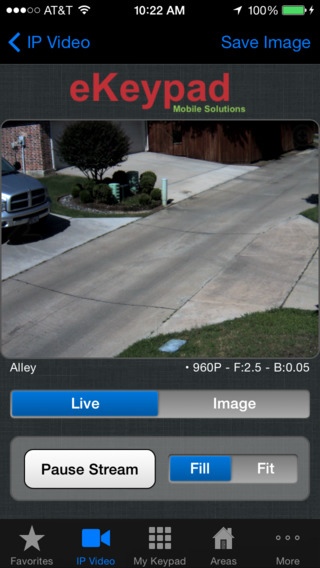
Transform your iPhone, iPad or Apple Watch into an advanced video monitoring system.
- Easy setup. Built in drivers make setup simple. Custom drives allow support of almost all cameras, DVRs and NVRs. And support is always happy to help.
- Access from anywhere. Advanced features and tools allow secure access both locally and while away.
- Custom Interfaces. The optional Blueprint module can be used to create customized iPad e-Map interfaces. This allows for easier control of larger systems and allows eKeypad to adapt to your unique interface needs.
- Professional Installers. Advanced features give end-users and professional installers the ability to manage and protect against the security and privacy risks.
Over 500 models of IP Cameras, analog to IP encoders, DVRs and NVRs have been tested and are supported. Don't see your surveillance equipment listed? Contact us. If possible, we will work with you to add support. Generic camera setup allows eKeypad to be configured to support almost all video surveillance products on the market.
Surveillance equipment supported by eKeypad Video:
IP Video Cameras Devices: ZuumMedia, Yoko Tech, Night Owl, Averfocus, HAI, Axis, Mobotix, Ness, Razberi Technologies, GrandStream, Sony, Dedicated Micros, IQinVision, Visualint, TRENDnet, Vitek, Wansview, ACTi, Channel Vision, Panasonic, Linksys, Level One, Sharx Security, Samsung, Wirepath, NetMedia, Asoni, D-Link, Wowwee, Y-Cam, GVI Security, Hunt, VisionTech, Toshiba, Bosch, Ubiquiti, Canon, Digital Watchdog, GeoVision, SMARTHOME, Foscam, Basler, Brickcom, Dahua, Vivotek, Etrovision, EverFocus, Hikvision, IC Realtime, Arecont, HikVision and LTS
Network DVRs and NVRs: Visualint, LTS, IC Realtime, Razberi Technologies, Ness, Everfocus, Dedicated Micros, Digital Watchdog, Wirepath, GVI Security, Hikvision, ZuumMedia, Night Owl and Yoko Tech.
eKeypad Platform Features:
- No 3rd party servers or services required
- No additional fees or services are required
- License supports all devices: iPhone, iTouch and iPad
- Universal application optimized for all platforms
- Unlimited number of devices can be configured
- Direct connections made to all devices to improve reliability
- Security features to safeguard your system data and access
- Configuration backup, restore and sharing via Wifi and email
- Secure access for Cellular and even faster access via Wifi
- Advanced management features for professional installers
Optional features:
- Custom screens via Blueprint module on the iPad
- Co-branding to customize the look of the GUI
Requires iOS 9.2 or later. Compatible with iPhone, iPad, and iPod touch.
About eKeypad Video
The company that develops eKeypad Video is eKeypad Mobile Solutions LLC. The latest version released by its developer is 3.0.4.
To install eKeypad Video on your iOS device, just click the green Continue To App button above to start the installation process. The app is listed on our website since 2009-12-16 and was downloaded 0 times. We have already checked if the download link is safe, however for your own protection we recommend that you scan the downloaded app with your antivirus. Your antivirus may detect the eKeypad Video as malware if the download link is broken.
How to install eKeypad Video on your iOS device:
- Click on the Continue To App button on our website. This will redirect you to the App Store.
- Once the eKeypad Video is shown in the iTunes listing of your iOS device, you can start its download and installation. Tap on the GET button to the right of the app to start downloading it.
- If you are not logged-in the iOS appstore app, you'll be prompted for your your Apple ID and/or password.
- After eKeypad Video is downloaded, you'll see an INSTALL button to the right. Tap on it to start the actual installation of the iOS app.
- Once installation is finished you can tap on the OPEN button to start it. Its icon will also be added to your device home screen.
Program Details
System requirements
Download information
Pricing
Version History
version 3.0.4
posted on 2009-12-16
Disclaimer
Official App Store Link
We do not host eKeypad Video on our servers. We did not scan it for viruses, adware, spyware or other type of malware. This app is hosted by Apple and passed their terms and conditions to be listed there. We recommend caution when installing it.
The App Store link for eKeypad Video is provided to you by apps112.com without any warranties, representations or guarantees of any kind, so access it at your own risk.
If you have questions regarding this particular app contact the publisher directly. For questions about the functionalities of apps112.com contact us.
